

















If your iPhone appears to send or receive the same text twice, first check what is actually repeating. Two alerts for one message, separate conversations with the same person and two delivered copies need different troubleshooting.
Why is my iPhone sending multiple texts?
Ask the recipient whether they see two separate message bubbles, or whether their phone simply alerts twice. If the problem is on your own phone, open the conversation and make the same check.
| What you see | What to check first |
|---|---|
| One message, repeated sounds or banners | The Messages Repeat Alerts setting. |
| Two conversation threads for one person | The phone number or email address used to start each thread. |
| The same message appears twice in a conversation | Record the times, message type and whether it affects one contact or several; follow the connection checks below. |
Do not assume that two SIMs, several Apple devices or an email address alongside your number are proof of a fault. Apple explicitly supports using a phone number and Apple Account together in Messages and FaceTime.
Stop repeated message alerts
If there is only one message in the conversation, check Settings > Notifications > Messages > Customise Notifications > Repeat Alerts. Select Never if you do not want repeat reminders. This changes notifications; it does not repair duplicated delivered messages. See Apple’s message-notification guide.
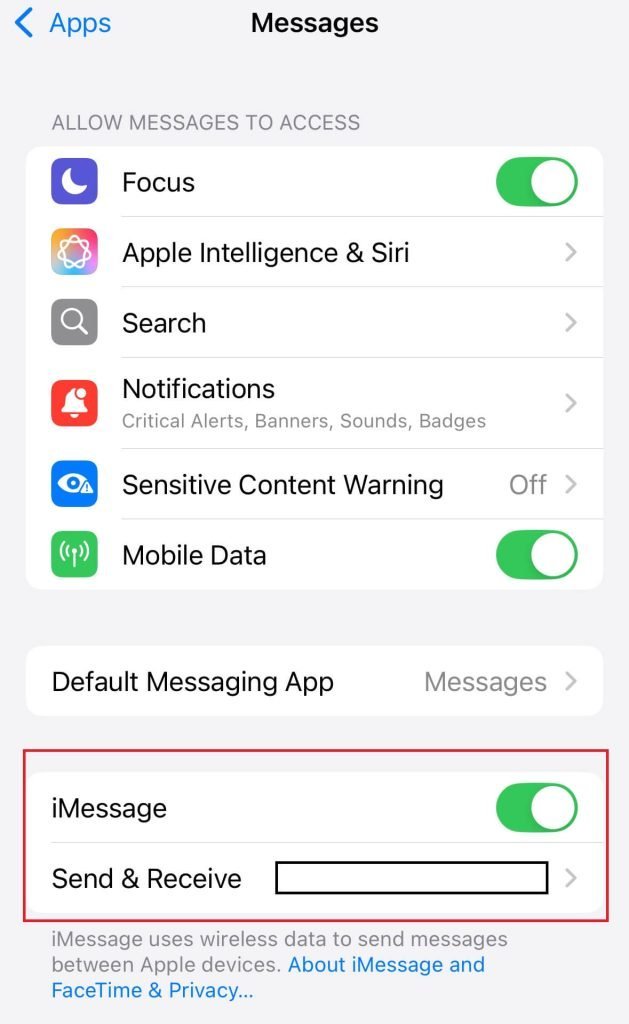
Check the number used for iMessage
For messages coming from an email address when you want to use your number, open Settings > Apps > Messages > Send & Receive. Select the intended number under Start New Conversations From.
Apple says an existing conversation started from an email address will not automatically switch to your number: start a new conversation if you want to change the sender identity. This can explain separate threads, but is not a diagnosis of repeated delivery. Follow Apple’s sender-address instructions. On older iOS versions, Messages may appear directly in Settings; use Settings search if needed.
After switching network, SIM or iPhone
Check that the correct mobile line is active in your mobile-data settings, especially with Dual SIM. A number used for iMessage needs an active SIM or eSIM associated with it. If you are keeping a number when changing network, ask the receiving provider to confirm that the transfer is complete. Editing a displayed number is not a substitute for that transfer.
If your number is waiting for iMessage activation, follow Apple’s activation checks. Activation uses SMS and your provider may charge. Apple says verification can take up to 24 hours after troubleshooting; if it remains incomplete, contact the provider and check that international SMS is supported. Repeatedly switching iMessage off and on is unnecessary while the number is being verified.
When messages really are duplicated
Keep an example with timestamps and note whether the bubbles are blue or green. Blue indicates iMessage; green can mean RCS, SMS or MMS. Bubble colour alone does not identify the cause.
Restart the phone normally, install available software updates and check your Wi-Fi or mobile connection. Confirm the recipient’s number or email is correct. Apple’s message troubleshooting page directs users to Apple Support for continuing iMessage problems and to their network provider for SMS, MMS or RCS problems.
Tell support whether the problem affects one contact or many, whether it began after a number transfer, and whether both devices show duplicate bubbles. That evidence is more useful than repeatedly changing unrelated settings. Avoid deleting conversations as a first step, particularly if they contain information you need to keep.
Reset network settings only when needed
A network reset is a later troubleshooting step for connection problems, not a guaranteed cure for duplicate texts. Apple advises trying other solutions first and consulting your IT team before resetting a school or business device. Have your Wi-Fi details available.
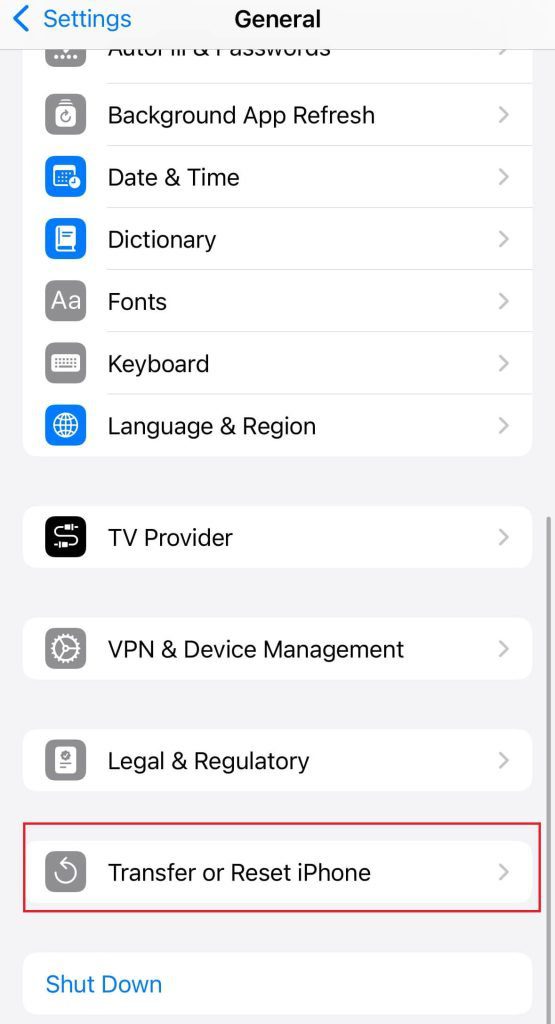
The path is Settings > General > Transfer or Reset iPhone > Reset > Reset Network Settings. Apple says this resets Wi-Fi networks and passwords, mobile settings, and VPN/APN settings. Read its network troubleshooting guidance before proceeding.
VPN settings installed through a configuration profile or device management are treated differently. A network reset does not erase your photos or apps, but Erase All Content and Settings does. Do not select that option, Delete All eSIMs or Reset All Settings as a substitute. Apple explains the separate reset options.
If the iPhone is unresponsive
Use a normal restart when the phone responds. A force restart is for an unresponsive device; it is not a factory reset or a guaranteed messaging fix. Apple’s model-specific instructions use these button combinations:
- iPhone 8 or later, including SE second generation or later: quickly press and release Volume Up, then Volume Down; hold the side button until the Apple logo appears.
- iPhone 7 or 7 Plus: hold the side button and Volume Down until the Apple logo appears.
- iPhone 6s or earlier, including first-generation SE: hold the Home button and side or top button until the Apple logo appears.
Frequently asked questions
Should I remove every email address from iMessage?
No. Apple supports both your number and Apple Account. Review which addresses you intend to use rather than removing them indiscriminately.
Does Reset Network Settings remove Bluetooth pairings?
Our earlier article conflated network reset with the broader Reset All Settings option. Apple lists Bluetooth pairings among the settings affected by Reset All Settings. These are different commands.
Can this guide guarantee that texts will be sent only once?
No. Persistent duplicate delivery needs investigation by Apple or the mobile provider. The steps above help identify the symptom and avoid unnecessary resets.
Correction, 16 October 2026: removed the unsupported claim that multiple enabled iMessage identities normally cause repeated delivery, the promised one-message fix and advice implying that editing My Number completes a network transfer. Corrected reset consequences and distinguished repeated notifications from separate threads and duplicated messages.